

-
Enter our annual bracket contests for a chance to win an Amazon Gift Card! Men's Bracket and Women's Bracket
You are using an out of date browser. It may not display this or other websites correctly.
You should upgrade or use an alternative browser.
You should upgrade or use an alternative browser.
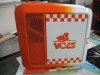
Tennessee Gaming PC
- Thread starter tennintx
- Start date

Bassmanbruno
Well-Known Member
- Joined
- Mar 16, 2007
- Messages
- 21,003
- Likes
- 1

Bassmanbruno
Well-Known Member
- Joined
- Mar 16, 2007
- Messages
- 21,003
- Likes
- 1
I got the computer at HP with VoodooDNA you can configure anyway you want it. The paint job is special edition though.
Bassmanbruno
Well-Known Member
- Joined
- Mar 16, 2007
- Messages
- 21,003
- Likes
- 1

- Joined
- Oct 23, 2003
- Messages
- 6,285
- Likes
- 1,910
NCGatorBait
VN GURU
- Joined
- Dec 12, 2003
- Messages
- 9,800
- Likes
- 0
Bassmanbruno
Well-Known Member
- Joined
- Mar 16, 2007
- Messages
- 21,003
- Likes
- 1

- Joined
- Feb 21, 2005
- Messages
- 22,150
- Likes
- 3,978

 (especially the cooling)
rwemyss
Formerly MODest
- Joined
- Sep 29, 2004
- Messages
- 15,860
- Likes
- 281
I assume one would go with an HP Blackbird for one of two reasons. 1) Don't think you are knowledgeable enough to build your own machine (seriously, it isn't hard) or 2) Just don't have the time to spec out and price components and put them together... or actually just really likes the look of the HP.
Either way is fine with me if you want to spend the $$$.
Either way is fine with me if you want to spend the $$$.

DC Vol
Agent Orange
- Joined
- Sep 18, 2007
- Messages
- 11,460
- Likes
- 601
I assume one would go with an HP Blackbird for one of two reasons. 1) Don't think you are knowledgeable enough to build your own machine (seriously, it isn't hard) or 2) Just don't have the time to spec out and price components and put them together... or actually just really likes the look of the HP.
Either way is fine with me if you want to spend the $$$.
You'd be very very very surprised how hard it is for a lot of people. I've been doing this sort of thing since I was a kid, so I don't find it even remotely difficult, but a lot of people find it a very daunting task. Especially when you start meddling with electricity, things get really hairy really quick.
rwemyss
Formerly MODest
- Joined
- Sep 29, 2004
- Messages
- 15,860
- Likes
- 281
Maybe... I'm in the same boat as you, so maybe I overestimate peoples' ability, but it seriously boils down to selecting components and slapping them together.You'd be very very very surprised how hard it is for a lot of people. I've been doing this sort of thing since I was a kid, so I don't find it even remotely difficult, but a lot of people find it a very daunting task. Especially when you start meddling with electricity, things get really hairy really quick.
Of course, when the machine doesn't boot because you placed the stick of RAM in the wrong slot, or worse, one of your dual channel matched pair of RAM is bad... or you didn't quite plug that molex connector in fully... or you didn't get a card fully engaged in a slot... A lot can go wrong on first boot to troubleshoot, and many don't have the patience for those possible eventualities.
Bassmanbruno
Well-Known Member
- Joined
- Mar 16, 2007
- Messages
- 21,003
- Likes
- 1
rwemyss
Formerly MODest
- Joined
- Sep 29, 2004
- Messages
- 15,860
- Likes
- 281
I hadn't really considered some of the technical aspects...Plus the average person wouldn't know about your motherboard capabilities and what to order without doing some research... whether its socket 775 etc and if it support a certain type of stuff.
That type of issue can be alleviated by purchasing a barebones setup instead of buying EVERY component separately... but I see your point.
Can you imagine how aggravated you would be if you bought a Mobo for a Phenom, but it is designed for a Core 2 Duo? Or even if you bought a PCI-X video card, just to find out that your motherboard doesn't have a PCI-X slot? (It said it had PCI! How was I supposed to know that doesn't include PCI-X?!)
Maybe it isn't quite as simple for the tech-illiterate as I imagine. :lol:
Bassmanbruno
Well-Known Member
- Joined
- Mar 16, 2007
- Messages
- 21,003
- Likes
- 1
Yeah - I did buy a barebones - but it came with the case/power supply/mobo installed but that was it. I found some that came w/ case/power/mobo/ram/dvd drive/processor.. all it needed was the graphics card.. was like $700 bucks on tiger direct but the deal went too fast (was like saving $200 I believe). Had a 6600 Quad core, 680i SLI mobo, 650 watt power supply, 2 gigs of ddr2 ram.. wasn't to shabby at all - I wasn't looking to spend more than $1,000.. I ended up buying basically the same thing though with 2 gigs more ram haha.. so lost out on $100 probably.
But I play about the same type of games (CoD rocks as does the orange box) - but my brother also got me to pre-order WAR... haven't really been into mmos but so far I'm enjoying it.
But I play about the same type of games (CoD rocks as does the orange box) - but my brother also got me to pre-order WAR... haven't really been into mmos but so far I'm enjoying it.
Advertisement
