

2207 users online now!   CONTACT US | ADVERTISE | REGISTER       

About this Page -- This is a discussion on Tutorial: View only new replies to threads you've posted in. within the forum Need Help?. 1. Go into your 'user cp' link at the top left hand corner of the page. 2. In the left ...
Go Back   VolNation > Other Forums > Need Help?

Reply
 
LinkBack Thread Tools Display Modes
Old 01-11-2008, 08:14 PM   #1 (permalink)
VolNation's Grand Poobah
 
vol_freak's Avatar

Join Date: Oct 2003
Posts: 32,133
Send a message via AIM to vol_freak Send a message via Yahoo to vol_freak
Tutorial: View only new replies to threads you've posted in


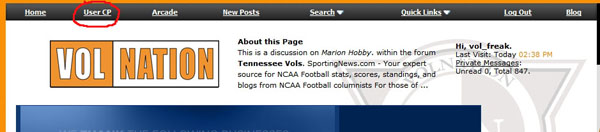
1. Go into your 'user cp' link at the top left hand corner of the page.


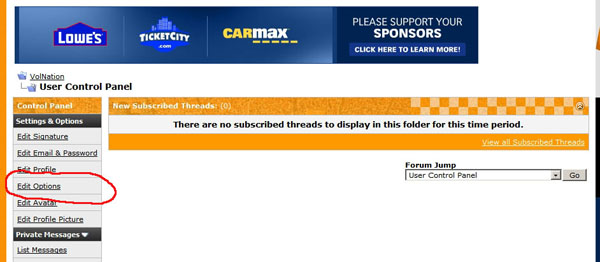
2. In the left column click on 'Edit Options'


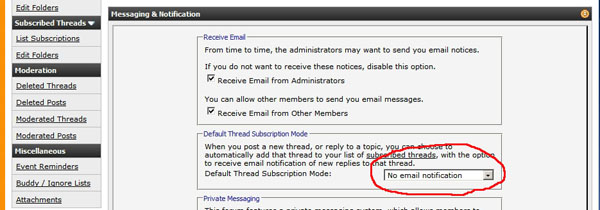
3. Scroll down to 'Default thread subscription mode. It should be set to do not subscribe. Change it to 'no email notification'.


4. From now on clicking on your 'user cp' link will show you a list of threads that you have posted in.
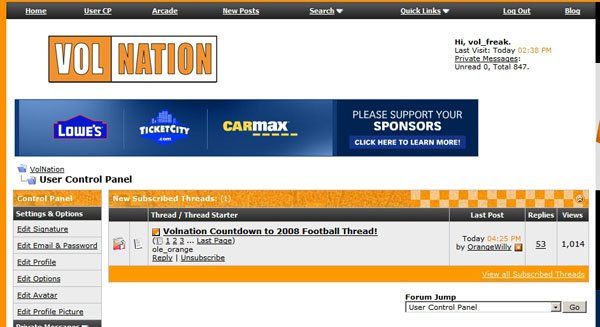


You can manually subscribe to any threads that you like (even if you haven't posted in them) by clicking on subscribe within the thread.
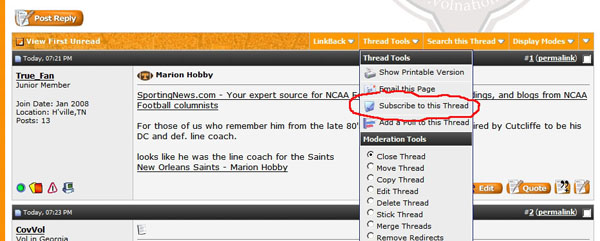


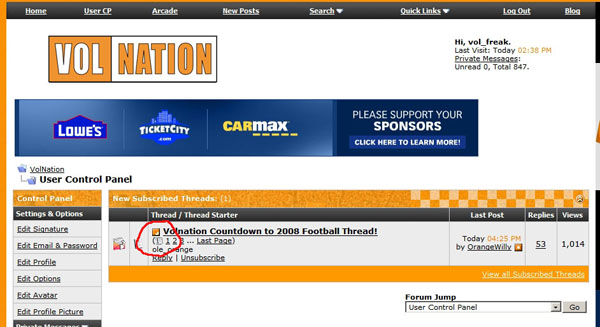
6. You can go directly to the first new in the thread since your last visit by clicking the icon just before the thread title.


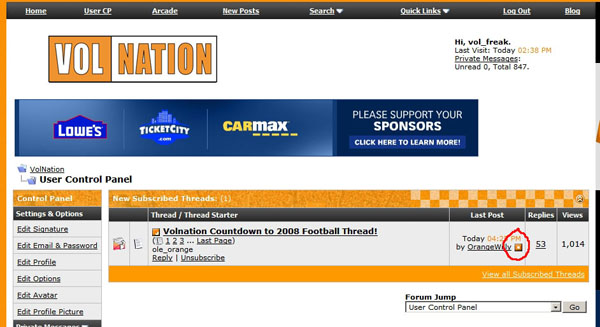
7. You can go directly the the very last post in any thread by clicking on this icon below:


Let me know if this helps.
vol_freak is offline   TOP Reply With Quote
Reply


Thread Tools
Display Modes

Posting Rules
You may post new threads
You may post replies
You may not post attachments
You may not edit your posts

BB code is On
Smilies are On
[IMG] code is On
HTML code is Off
Trackbacks are On
Pingbacks are On
Refbacks are On


All times are GMT -5. The time now is 02:55 PM.


Powered by vBulletin® Version 3.7.6
Copyright ©2000 - 2009, Jelsoft Enterprises Ltd.
Search Engine Optimization by vBSEO 3.3.2

1 2 3 4 5 6 7 8 9 10 11 12 13 14 15 16 17 18 19 20 21 22 23 24